Streamline Audit.
Strengthen Trust.
NFRA inspection orders cite missing risk assessments, undocumented materiality, and absent walkthrough evidence. Emblem builds SA-compliant documentation into every step — so there's nothing to flag.
Emblem ensures every audit information is documented per ICAI SA standards before you sign the report.
Your Compliance Shield Against NFRA Observations
NFRA's March 2026 inspection reports flagged the same pattern across firms — insufficient documentation, weak risk assessments, and missing audit evidence. Emblem is a Desktop audit software that bakes compliance into every step, replacing disconnected spreadsheets, shared drives, and email-based review with one offline app covering the full engagement lifecycle.
Every module is designed around ICAI Standards on Auditing, Companies Act, CARO, Peer Review and Quality Review requirements. From SA 230 documentation trails to SA 315 risk assessments — Emblem ensures your audit file is a complete defense document that stands up to any NFRA inspection. Your Data Stays With You only.
Offline-First Desktop Architecture
Emblem is installed directly on your Windows computer. Client data stays on your machine — meeting SA 200 ethical requirements for confidentiality. No cloud uploads, no third-party access, no data breach risk during NFRA inspections.
Privacy & Quality Compliance
NFRA's 2026 reports emphasise that audit files must be "defense documents" proving your opinion was justified. Emblem guarantees complete data isolation while ensuring all required audit documentation is structured in one place.
ICAI Standards, Companies Act & CARO
NFRA repeatedly flags non-compliance with SA 315 (risk assessment), SA 330 (audit response), and SA 500 (audit evidence). Every Emblem module maps directly to these standards — so your workpapers satisfy NFRA expectations by design.
Your Data Stays With You Only
SA 230 requires audit file assembly within 60 days of the report date. Emblem stores all engagements in an encrypted local SQLite database within your workspace — giving you 100% control over assembly, backups, and firm archives.
NFRA doesn't accept "we did it but didn't document it"
Every NFRA inspection order published in 2026 cites documentation gaps as a primary deficiency. Missing workpapers mean disciplinary risk — even if the audit work was actually performed. Emblem closes these gaps.
- SA 230 compliant documentation trail for every procedure
- Work in native Excel and Word
- Timestamped partner signoffs per SA 220
- Peer Review and NFRA inspection ready
See the app in action
Browse through Emblem's key screens.

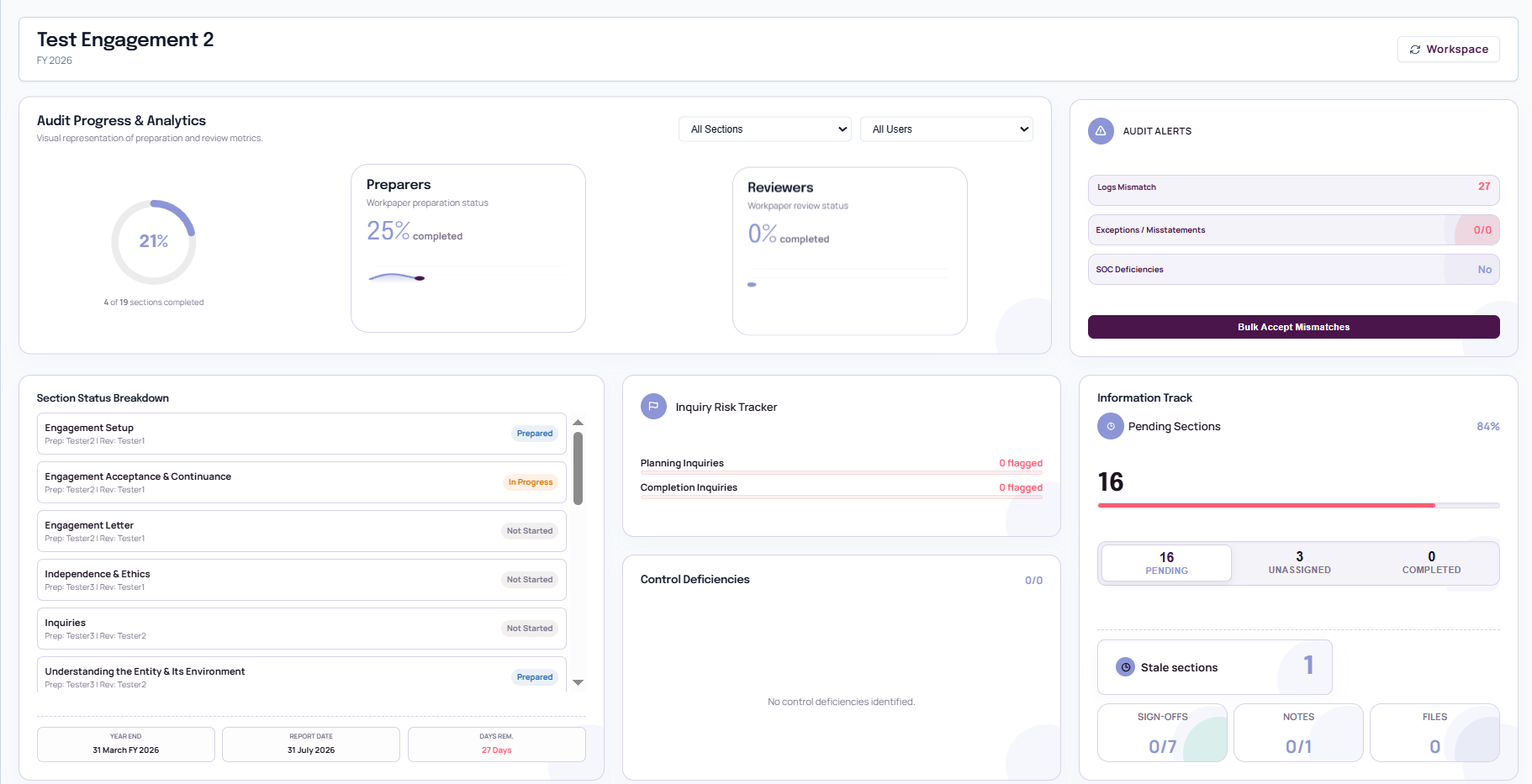
Everything you need, nothing you don't
Purpose-built for audit engagements from planning through to conclusion.
Engagement Setup
Central command centre for client onboarding, team assignments, and timelines.
Planning & Risk
Document strategy, entity understanding, risk assessment, and engagement acceptance.
Materiality
Overall materiality, performance materiality, and trivial thresholds — all calculated.
Scoping
Import trial balances, scope FSLIs, and drive procedures from the scoping matrix.
Risk Response
Assess identified risks and design appropriate audit responses with guided procedures.
Controls Testing
Walkthrough controls, test design and effectiveness, track deviations, and flag deficiencies.
Substantive Testing
Sampling calculator, workpaper generation, and procedure tracking with audit evidence.
Conclusion & Signoffs
Consolidated conclusions, ICFR evaluation, and signoff workflow.
Attachments
Central document manager with placeholder mapping across all engagement sections.
Review Notes
Add review notes to any section with threaded discussions and timestamped logs.
Templates
Upload and manage XLSX, DOCX document templates for workpaper generation.
Activity Logs
Every action logged with timestamps across all modules for full traceability.
What NFRA flags vs. What Emblem prevents
These are actual observations from NFRA's March 2026 inspection reports. Every one of them is a gap Emblem closes by design.
NFRA Flagged (2026)
- Insufficient audit documentation (SA 230)
- Weak risk assessment procedures (SA 315)
- Missing walkthrough & controls evidence (SA 330)
- Inadequate review by senior team (SA 220)
- Failure to obtain sufficient audit evidence (SA 500)
Emblem Solves It
- SA 230 documentation trail for every procedure
- SA 315 risk assessment built into planning module
- SA 330 walkthrough evidence auto-captured
- SA 220 partner review with timestamped signoffs
- SA 500 audit evidence mapped to each assertion
Who should use Emblem
Purpose-built for audit professionals who need speed, accuracy, and compliance.
Chartered Accountants
Handling statutory audits for clients across industries.
CA Firms
Managing multiple client audits at scale.
CA Students
To understand how audit works
Built for trust and NFRA compliance
Emblem is designed from the ground up for audit firms that take NFRA readiness, data security, and SA compliance seriously.
100% Offline
Emblem runs entirely on your local machine. No cloud servers, no internet dependency — your work is always accessible, even without connectivity.
Data Privacy First
NFRA expects firms to safeguard client data integrity. All engagement data stays on your local workspace with zero tracking, zero telemetry, and zero third-party access. Your firm's data never leaves your control.
NFRA & ICAI SA Compliant
Built to satisfy NFRA inspection expectations — SA 230 documentation trails, SA 315 risk assessments, SA 220 partner signoffs, and SA 500 audit evidence mapping. Your audit file becomes your defense document.
Frequently asked questions
Is Emblem free?+
No. However, a trial version with limited features is available for free.
Does Emblem require an internet connection?+
An active internet connection is needed at activating license. Every time the app is opened or 48 hours of inactivity, an internet connection is required for Firebase authentication when logging in. Once logged in, no internet is required for work.
Where is my data stored?+
All data is stored locally on your machine. You choose a workspace folder during setup, and all engagement data lives within that folder in your system.
Can I use Emblem on multiple machines?+
Emblem is currently undergoing a built-in LAN feature that allows the workspace to be accessed from multiple machines on the same network. Please keep on checking for next update.
How do I back up my data?+
Simply back up your workspace folder using your preferred backup tool (cloud sync, external drive, etc.). All engagement data is contained within that folder.
How do I update Emblem?+
Please look for the update option under the view menu, within the app.
What file formats are supported for trial balance import?+
The scoping module supports XLSX (Excel) and PDF imports.
Can I add custom templates?+
Yes. Emblem has a template management system (accessible from the dashboard). You can upload XLSX, DOCX, and PDF templates that will be stored in your workspace and available when creating workpapers.
Can I switch from monthly to yearly?+
Yes. You can upgrade from monthly to yearly billing at any time.
What happens after the introductory 3 months?+
Pricing reverts to the regular rate: ₹1,299/month or ₹14,999/year. No lock-in — you can cancel anytime.
Is there a free trial?+
Yes. Download the trial version with limited features before subscribing.
Worried about your next NFRA inspection?
Whether you need help understanding NFRA compliance gaps, want a walkthrough of how Emblem maps to SA standards, or just want to talk audit quality — reach out. We usually reply within one business day.
Sat: 9:00 AM to 5:00 PM